A home loan mortgage calculator is one of the most useful tools a prospective homebuyer or refinancer can have. It helps you estimate what your monthly payments might look like, how much total interest you will pay, and how changes in variables (interest rate, down payment, loan term, taxes, insurance) affect affordability. On this page, we’ll dive deep into how a home loan mortgage calculator works, what inputs you should include, and how to interpret the results to make smarter decisions.
What Is a Home Loan Mortgage Calculator?
It’s a financial tool (often web-based) that takes your inputs — home price, down payment, interest rate, loan term, property taxes, insurance, sometimes PMI (private mortgage insurance) — and outputs your estimated monthly payment, amortization schedule, total interest, and payoff timeline.
Unlike a simple “loan calculator,” a true mortgage calculator often includes extras like taxes, insurance, PMI, and other costs associated with homeownership.
Key Inputs & Variables
Here are the typical inputs and why each matters:
| Input | Description | Why It Matters |
|---|---|---|
| Home Price / Purchase Price | The cost of the property you plan to buy | Determines the starting base for your loan amount |
| Down Payment | Cash you pay upfront (percentage or absolute) | Reduces the principal you need to borrow; may affect PMI |
| Loan Amount | Home price minus down payment (plus or minus credits) | This is the actual principal on which interest accrues |
| Interest Rate (Annual %) | The mortgage interest rate (APR or nominal) | One of the biggest drivers of monthly cost & total interest |
| Loan Term (years) | Duration of the mortgage (e.g. 15, 20, 30) | Affects the number of payments and interest burden |
| Property Taxes (annual or %) | The yearly real estate tax for that home | Usually collected monthly via escrow or added to payment |
| Homeowner’s Insurance (annual) | Insurance for the property | Similar to taxes, often included via escrow |
| PMI / Mortgage Insurance | Insurance required if your down payment is under a threshold (e.g. 20%) | Adds monthly cost until equity threshold reached |
| Extra Payments / Prepayments | Optional extra principal you plan to pay monthly or annually | Helps you shorten the loan and reduce total interest |
Core Formula & Calculation
At the heart of the mortgage calculator is the standard annuity (loan amortization) formula to compute the principal + interest portion of each payment:
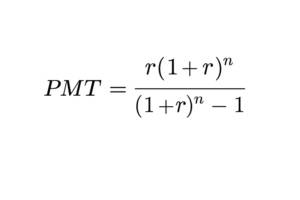
Where:
PMT = monthly principal + interest payment
P = loan principal (amount borrowed)
r = monthly interest rate = (annual interest rate) ÷ 12
n = total number of payments = (loan term in years) × 12
Once you have the base PMT, you can add in monthly taxes, insurance, and PMI to get a fully loaded “all-in” monthly cost.
(You can find more on the formula and derivation in general mortgage calculator articles or on Wikipedia’s “Mortgage calculator” page.) The calculator also typically produces an amortization schedule: for each payment, it shows how much goes to interest, how much to principal, and the remaining balance.What Outputs / Results to Show
A good home loan mortgage calculator should present:
Monthly payment (principal + interest)
Monthly payment including taxes, insurance, PMI (if included)
Total interest paid over the life of the loan
Total payments (principal + interest + other costs)
Amortization schedule (detailed breakdown by month or year)
Graphs (balance vs time, interest vs principal)
Sensitivity or “what-if” scenarios (if interest increases, extra payments, shorter term, etc.)
These outputs allow users to compare different scenarios (e.g. 15-year vs 30-year, different down payments) side by side.
Use Cases & Benefits
Affordability check: Before house hunting, you can input various home prices and down payments to see what monthly payment you can comfortably afford.
Scenario comparison: Try changing interest rates, loan terms, or down payment levels to see which setup is most favorable.
Pre-approval / lender discussions: You can bring these numbers to your mortgage broker or lender as a reference point.
Refinance planning: See how much you could save in monthly payments or interest by refinancing at lower rates or shorter terms.
Early payoff planning: Use the extra payments option to see how much faster you can clear the loan and how much interest you’d save.
Tips to Improve Accuracy & What to Watch Out For
Use realistic interest rates and fees: Be sure to use current market rates and factor in closing costs, points, etc.
Local taxes & insurance vary: Use actual local rates rather than generalized estimates.
PMI removal timing: If your equity reaches a threshold (e.g. 20 %), PMI can often be removed; your calculator should reflect that possibility.
Adjust for inflation, tax benefits, maintenance costs: A mortgage calculator is a tool, not full financial planning—make sure you consider operating costs and tax effects separately.
Rounding / compounding differences: Small rounding or compounding differences (daily vs monthly interest conventions) may slightly change results.
Assume stable rates unless adjustable loans: For fixed-rate loans, the rate stays constant; for adjustable rate mortgages, you’ll need a tool that handles rate adjustments over time.
Sample Example
Here’s a simplified example to illustrate:
Home Price: $300,000
Down Payment: 20% → $60,000
Loan Amount: $240,000
Interest Rate: 4.5% (annual)
Term: 30 years
Annual Property Tax: $3,600
Annual Insurance: $1,200
No PMI (because down is ≥ 20%)
Loan principal = $240,000
Monthly interest rate = 4.5% ÷ 12 = 0.375% = 0.00375
Number of payments = 30 × 12 = 360
Use formula to find base payment ≈ $1,216.04
Monthly tax = $3,600 / 12 = $300
Monthly insurance = $1,200 / 12 = $100
All-in payment = $1,216.04 + 300 + 100 = $1,616.04
Over 30 years, the total interest paid (in this example) would be about $197,775 (plus the other costs). This kind of breakdown is what your calculator can deliver to users.