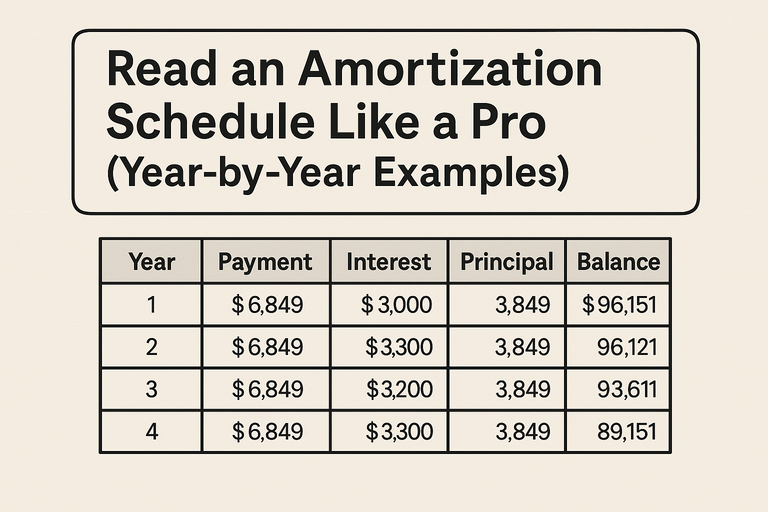
When you make a mortgage payment, part goes to interest, and part chips away at your principal balance.
An amortization schedule shows exactly how that balance shifts over time—month by month or year by year.
Once you know how to read it, you can:
Track how fast you’re building equity,
Time a refinance for maximum savings,
and plan smart extra-payment strategies.
👉 Start here: Amortization Schedule Calculator
1. What an Amortization Schedule Is (and Isn’t)
Definition:
An amortization schedule is a detailed table showing every payment on a loan, with columns for payment number, principal paid, interest paid, remaining balance, and (sometimes) cumulative interest.
What it shows you:
How your loan balance decreases over time
How the share of interest vs principal changes
The total interest you’ll pay if you make no extra payments
What it doesn’t show:
Property taxes, insurance, or HOA dues (those are separate escrow costs)
PMI or other add-on fees unless the calculator includes them
2. The Core Mechanics
Each month, interest is calculated on your current balance:

Then the rest of your payment reduces principal:
Principal=Monthly Payment−Interest
3. Example: $300,000 Loan at 6% for 30 Years
| Year | Payment | Principal Paid | Interest Paid | Remaining Balance |
|---|---|---|---|---|
| 1 | $21,600 | $3,500 | $18,100 | $296,500 |
| 5 | $21,600 | $4,600 | $17,000 | $278,000 |
| 10 | $21,600 | $5,800 | $15,800 | $247,000 |
| 20 | $21,600 | $8,900 | $12,700 | $160,000 |
| 30 | $21,600 | $21,600 | $0 | $0 |
Only after year 15–20 does principal reduction accelerate.
4. Principal vs Interest: The 50/50 Crossover Point
Every amortizing loan has a point where you’ve paid equal amounts of interest and principal cumulatively.
For a typical 30-year mortgage at 6%, that crossover occurs around year 19.
Why it matters:
That’s roughly when equity growth accelerates.
If you refinance before then, you’re mostly swapping one interest-heavy period for another—so time refis carefully.
5. How to Use the Schedule for Refinancing Decisions
A refinance resets your amortization.
If you’ve been paying for 7–10 years, look at the interest vs principal split:
| Year | Interest % of Payment |
|---|---|
| 1 | 83% |
| 5 | 78% |
| 10 | 70% |
| 15 | 55% |
Use the Mortgage Refinance Calculator to check whether your interest savings outweigh the reset cost.
6. Spotting Opportunities for Extra Payments
Amortization schedules also reveal how extra principal changes the trajectory.
Example:
Add $200/month to principal starting in Year 1.
Loan paid off ~5 years early
Interest savings ≈ $60,000
You can verify this instantly using the Mortgage Loan Extra Payments Calculator
7. Annual vs Monthly Views
| Format | Pros | Best For |
|---|---|---|
| Monthly | Detailed, precise interest tracking | Short-term planning, budgeting |
| Annual | Easier to visualize trends | Long-term equity growth, tax estimates |
8. Graphs: How to Interpret the Curves
A good calculator will graph:
Principal vs Interest per payment — interest declines, principal rises.
Balance over time — a steep downward slope that flattens toward payoff.
If you’re deciding between 15- and 30-year terms, compare how steeply the principal curve drops. Shorter terms mean faster equity and less total interest.
9. Common Misreads (and How to Avoid Them)
“My balance doesn’t drop much at first—something’s wrong.”
That’s normal amortization; early payments are mostly interest.“I’ll pay the same interest every month.”
False. The dollar amount of interest falls over time because your balance shrinks.“Refinancing always saves money.”
Not necessarily—check the total interest across both loans, not just the payment.“Extra payments only help at the start.”
Extra principal helps anytime—it reduces remaining balance, saving future interest.
10. Pro Tip: Use the Schedule for Tax and Equity Planning
Tax timing: You can see annual interest totals for deductions (if itemized).
Equity milestones: Plan when you’ll hit 20% equity to drop PMI or refinance to remove FHA MIP.
Retirement planning: Align your final payoff year with your retirement date.
| Insight | Why It Matters |
|---|---|
| Interest declines, principal rises | Helps you understand true equity growth |
| 50/50 crossover ≈ year 19 (30-year loan) | Indicates when you’ve paid more principal than interest |
| Refinancing resets amortization | Don’t restart the clock too soon |
| Extra payments save interest | Even small amounts make a big impact |
FAQ (Schema-Ready)
Why does my amortization schedule show more interest than principal early on?
Because interest is based on the remaining balance—large early balances mean higher interest portions.How often should I review my amortization schedule?
Annually, or whenever you make rate, term, or extra-payment changes.Will refinancing reset my schedule?
Yes, you’ll start a new amortization curve—so weigh the lower rate against a longer payoff horizon.Where can I get a printable schedule?
Use our Amortization Schedule Calculator to download a CSV or PDF version.